
WINDOWS · LINUX · APPLE MAC
CCTV installer software for the whole site visit
SADPTools keeps camera discovery, supported configuration, Live View and handover information together. Carry the same practical CCTV tools on a Windows, Linux or Apple Mac laptop.
Download SADPTools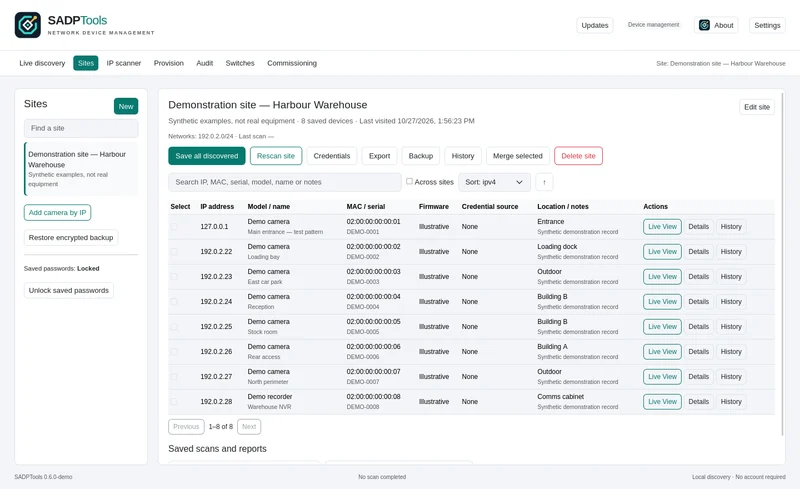
1. Discover and identify the equipment
Find compatible Hikvision equipment with SADP, use ONVIF where supported, add known camera IPs, or inspect an explicit routed network range. Compare the model, serial and MAC address before selecting a device. The camera discovery guide explains which method fits each connection.
2. Commission supported cameras deliberately
Activate inactive devices, configure supported IPv4 or DHCP settings, and review planned batch operations before applying them. Device and firmware support is checked per action. A timeout is an unconfirmed outcome: rediscover and investigate before sending another change.
For Hikvision installers, the SADP guide covers local discovery and the difference between finding a device and configuring it. Recovery tools use existing authorised methods, including supported security questions; they are not a password bypass.
3. Check the picture while you keep working
Live View opens in a separate window and starts playing automatically, leaving the main inventory available. Inspect supported stream information, image settings, focus and PTZ controls. Reachability, credentials, codecs and the camera's capabilities determine which controls work.
Use Live View screenshots to see the interface. These tools help commission and diagnose cameras; SADPTools is not a replacement for a production NVR or video management system.
4. Diagnose the network and retain useful evidence
The toolkit includes connectivity and service checks, supported ONVIF and ISAPI inspection, recording metadata, event tools, network diagnostics and planning utilities. Use the complete CCTV feature catalogue to check each tool's requirements and limits. Calculated storage or bandwidth estimates are planning aids, not measurements of a live installation.
5. Save a site and move it to another laptop
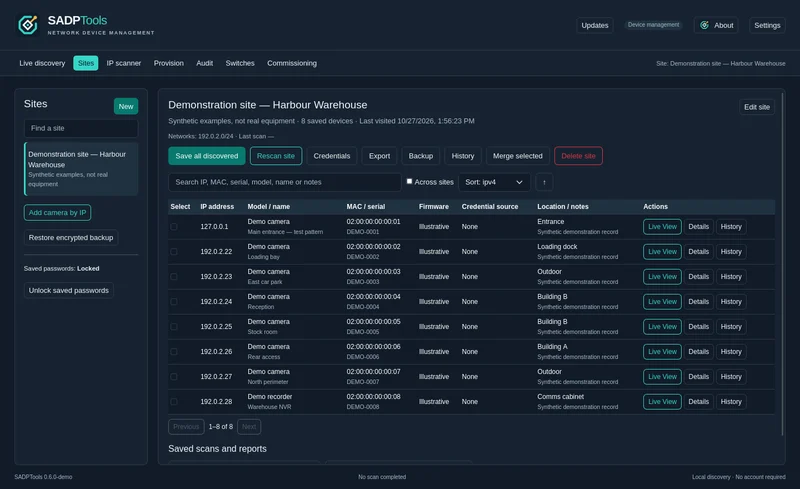
Keep named sites, equipment, locations, notes and known credentials together. Export the entire site as an encrypted .sadpsite file and import it on another laptop. Choose a transfer passphrase and provide it separately to the authorised recipient.
NX Camera Info JSON imports can include cameras and known passwords. Full reports also retain NX Witness system, server, user, storage and licence information in encrypted storage. A read-only NX Witness screen appears for those imported sites; ordinary sites created through discovery have no empty server area. Exporting a site preserves this information for the next laptop.
6. Prepare the handover
Create commissioning reports, equipment labels and reviewed diagnostic bundles. Keep a portable site backup for follow-up work. Review any export before sharing it, particularly when it contains credentials, licence information or customer details.
Choose your laptop, keep your workflow
- Windows 10/11 AMD64: an installer with the display runtime included, or a standalone ZIP for a machine with WebView2 already installed.
- Linux AMD64: DEB, RPM or a manual tar.gz installer with desktop-menu integration. GTK4 and WebKitGTK requirements apply.
- Apple Mac: a universal DMG or ZIP for Apple Silicon and Intel, targeting macOS 12 or later. Current bundles are not notarised; real Mac hardware testing remains necessary.
SADPTools is free to use, with no subscription, app account or application telemetry. Site data stays on your computer. See Windows installation help, Mac installation help and the privacy information.